
Shopify Discount Code Before Checkout: Cart Widget Guide
Add a Shopify discount code field before checkout, reduce cart friction, and use AIOD's discount input widget for code-based gift offers.
A Shopify discount code before checkout lets shoppers enter a promo code while they are still on the cart page, cart drawer, or another pre-checkout step. The goal is simple: show the shopper that the offer works before they commit to checkout.
This matters because the cart is where hesitation shows up. A shopper has products in the cart, but they still want to know whether the creator code, email code, free gift code, or loyalty code will actually work. If the only discount field appears later in checkout, some shoppers leave the cart to search for codes or second-guess the offer.
AIOD solves this with a discount input widget that can sit before checkout and connect the code to a visible promotion, such as a free gift offer. The shopper can enter the code, see the campaign message, and understand the reward before moving forward.
Quick answer: can Shopify show a discount code before checkout?
Yes, but the right approach depends on what you need the cart to do. Shopify discount codes are normally entered at checkout, and Shopify's discount documentation explains that codes can reduce the order by amount, percentage, free shipping, or Buy X Get Y logic. A pre-checkout field needs to either pass that code into checkout, apply it to the cart through a supported cart flow, or use an app widget that handles the shopper experience more cleanly.
If the code only needs to be remembered until checkout, a lightweight theme solution can work. If the code should unlock a gift, update a cart message, validate eligibility, coordinate with automatic discounts, or reduce support tickets, use an app-level widget like AIOD.
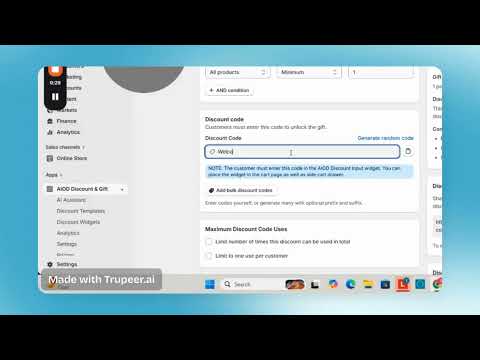
AIOD example: a code-based free gift offer paired with a storefront widget so the shopper sees the promotion before checkout.
Why shoppers look for the code field before checkout
A discount field is not only a form input. It is a trust checkpoint. When shoppers cannot find it, they often assume one of three things: the code is fake, the store is hiding the discount until later, or they need to leave the cart and search again.
That behavior creates a measurable problem for Shopify teams. The shopper is no longer focused on the cart. They are comparing coupon sites, checking email, searching creator descriptions, or asking support whether the code works. The more complex the promotion, the more expensive that friction becomes.
Common moments when a pre-checkout code field helps
- Influencer and affiliate campaigns where the shopper arrives with a creator code.
- Email and SMS offers where the code needs to feel valid before checkout.
- Free gift campaigns where the shopper wants to see the gift before paying.
- VIP or loyalty offers where the cart should explain why a shopper qualifies.
- Seasonal campaigns where several discounts, gifts, and shipping offers may be active together.
The three ways to handle Shopify discount code before checkout
There are three practical paths. The best choice depends on whether you only need to pass a code into checkout or whether you need a full promotion experience in the cart.
1. Pass the code to checkout
The simplest pattern is a cart input that stores the shopper's code and sends it with the checkout URL. This can work for simple stores that only need the discount to apply once the customer reaches checkout.
The downside is expectation management. If the cart total does not update before checkout, the shopper may not know whether the code is valid. If the code has product restrictions, minimum purchase rules, or combination limits, the cart page can say too little too late.
2. Update cart discount codes through a cart-aware flow
Shopify's Storefront API includes cartDiscountCodesUpdate , which updates discount codes on a cart and lets the implementation check whether each code is applicable. This is stronger than a hidden URL handoff because the cart can reason about the code before checkout.
The tradeoff is engineering complexity. You need the right cart architecture, error states, revalidation, theme behavior, and QA across cart page, cart drawer, mobile, and checkout. For many teams, that becomes a small product surface rather than a small snippet.
3. Use a discount input widget
A widget is the best path when the code is tied to a campaign experience, not just a price adjustment. AIOD's discount input widget can support code-based promotion flows where shoppers enter a code before checkout and see the connected offer in the storefront.
This is especially useful for code-based free gift offers. The field is not just asking for text. It is helping the shopper understand: "This code unlocks this offer, this is what you need in cart, and this is what happens next."
AIOD example: free gift offer using code and widget
AIOD's video example, Setting up Free Gift Offer Using Code & Add a Widget, shows the core pattern this article recommends: pair a discount code with a visible storefront widget so the shopper can interact with the offer before checkout.
The important strategic point is not only that the code exists. The offer becomes visible before checkout. That lets the merchant explain the free gift, reduce confusion, and give shoppers a reason to continue instead of hunting for another coupon.
What a good discount input widget needs
A discount code field before checkout should do more than accept text. It should behave like a promotion control surface. If the widget cannot explain eligibility, invalid codes, cart requirements, and the next action, it can create as much friction as it removes.
| Widget requirement | Why it matters |
|---|---|
| Visible before checkout | Shoppers can confirm the code before leaving the cart. |
| Clear success message | The shopper sees that the campaign accepted the code. |
| Helpful invalid-code message | The store avoids vague errors that send shoppers to support. |
| Promotion context | The widget explains whether the code unlocks a gift, discount, shipping offer, or special campaign. |
| Mobile-friendly placement | Most cart abandonment happens on cramped mobile screens where hidden fields are easy to miss. |
| Compatibility with other discounts | The code must not create unclear conflicts with automatic offers, volume tiers, BOGO, or shipping discounts. |
Discount code before checkout vs automatic discount
The choice is not always code or automatic. Many strong campaigns use both: a code for attribution or audience control, and automatic logic for the actual cart behavior.
| Campaign type | Best method | Reason |
|---|---|---|
| Creator code for a private audience | Discount code before checkout | The code reinforces attribution and lets the shopper confirm the creator offer. |
| Storewide sale | Automatic discount | No shopper action is needed, so a code field adds friction. |
| Free gift unlocked by a code | AIOD discount input widget | The widget can explain the gift and cart requirements before checkout. |
| Volume or tiered discount | Automatic discount with progress messaging | The shopper needs to see the next threshold while building the cart. |
| VIP segment offer | Code plus eligibility rules | The code should work only for the intended audience and cart conditions. |
Where to place the discount code widget
Placement changes performance. If the field appears too early, shoppers may ignore it. If it appears too late, shoppers may leave to find a code. The best location is usually near the cart summary, before the checkout button, with a short message that explains the campaign.
Best placements
- Cart drawer: Best for stores where most shoppers review the cart without visiting a full cart page.
- Cart page: Best for stores with larger baskets, gift selection, or bundle review before checkout.
- Sticky cart summary: Useful when the checkout button remains visible as shoppers adjust quantities.
- Campaign landing page: Useful for creator or email campaigns where the code should be introduced before products are added.
Do not add the same field in five places. One obvious field near the purchase decision is better than several repeated widgets competing for attention.
How to write the widget copy
The copy should answer one question: what happens if the shopper enters the code? Avoid vague labels like "Coupon" when the code unlocks a specific reward.
| Weak copy | Better copy |
|---|---|
| Coupon code | Enter your gift code |
| Apply | Unlock gift |
| Invalid code | This code is not active for the items in your cart. |
| Discount applied | Gift code accepted. Add one eligible item to claim it. |
How AIOD fits the workflow
AIOD is strongest when the code field needs to connect with the rest of the promotion system. A basic code field can collect a value. AIOD helps the campaign behave like a complete cart experience.
- Use discount input widgets for code-triggered offers before checkout.
- Pair codes with free gift campaigns, BOGO, volume offers, or shipping incentives.
- Show promotion messaging in the cart instead of relying only on checkout errors.
- Control exclusions so sale items, subscription products, or protected SKUs do not create margin issues.
- Coordinate code-based offers with automatic discount rules and combination settings.
For the wider promotion engine, see AIOD's Shopify automatic discount app page. If your main offer is a gift, use the free gift with purchase guide as the next step.
QA checklist before publishing the widget
A pre-checkout discount field touches money, cart state, and trust. Test it like a checkout feature, not like a small theme block.
- Valid code with eligible cart.
- Valid code with ineligible cart.
- Expired or inactive code.
- Code with excluded products in cart.
- Code combined with active automatic discounts.
- Code on mobile cart drawer and full cart page.
- Quantity change after code is accepted.
- Removing the qualifying product after code is accepted.
- Checkout handoff after the widget shows success.
- Analytics event for code apply, code accepted, code rejected, and checkout click.
Measurement: how to know if it worked
Do not judge the widget only by total discount usage. The real question is whether it reduces hesitation and improves cart-to-checkout movement without giving away unnecessary margin.
Track these events
- Widget viewed.
- Code entered.
- Code accepted.
- Code rejected.
- Gift or reward shown.
- Checkout clicked after accepted code.
- Completed order with code.
Watch these ratios
- Code accepted rate: accepted codes divided by submitted codes.
- Cart-to-checkout rate after accepted code.
- Checkout completion rate after accepted code.
- Average order value with code compared with no-code carts.
- Support tickets mentioning coupon, code, gift, or discount.
Common mistakes
Showing the field without explaining the offer
A blank field can make shoppers hunt for coupons. If there is no active public campaign, use contextual copy such as "Have a creator or VIP code?" instead of encouraging everyone to search for one.
Letting invalid-code errors feel generic
"Invalid code" is technically correct but rarely useful. Tell the shopper whether the code is expired, not eligible for the cart, not combinable, or missing a required item when your tooling can detect it.
Ignoring discount combinations
A pre-checkout code can collide with automatic discounts, free shipping, or product markdowns. Read the guide to Shopify discount combinations before running several incentives together.
Skipping mobile QA
The cart drawer is often tighter than the cart page. Test the widget on real mobile dimensions, with the keyboard open, and with a long discount code pasted into the field.
FAQ
Can customers enter a Shopify discount code before checkout?
Yes. You can add a pre-checkout field that passes a code into checkout, build a cart-aware integration, or use an app widget. For campaign-heavy stores, an app widget is usually better because it can explain the offer and reduce invalid-code confusion.
Does Shopify show the discount code field on the cart page by default?
Not as a full cart-page promotion experience. Shopify's standard flow centers discount code entry around checkout. If you want the cart page or cart drawer to handle code entry, messaging, and validation, you need theme work, a cart API implementation, or an app.
Can a discount code unlock a free gift before checkout?
Yes, if the promotion engine supports that workflow. AIOD can pair code-based offers with storefront widgets so shoppers understand the gift campaign before checkout.
Is a discount input widget better than an automatic discount?
It depends on the campaign. Use automatic discounts when every eligible shopper should get the offer with no action. Use a discount input widget when the shopper has a creator, VIP, email, or gift code and needs to confirm the offer before checkout.
Will a pre-checkout discount field reduce abandonment?
It can, especially when shoppers already expect to use a code. The field works best when it gives clear feedback, keeps the shopper in the cart, and connects the code to a visible reward instead of pushing the shopper to search elsewhere.
Bottom line
A Shopify discount code before checkout is not just a convenience feature. It is a cart confidence feature. If the shopper has a code, show them where to use it, explain what it unlocks, and make the next step obvious.
For simple stores, passing the code into checkout may be enough. For code-based gifts, creator campaigns, VIP offers, and stacked promotions, AIOD's discount input widget gives the cart a clearer job: accept the code, explain the reward, and move the shopper toward checkout with less uncertainty.