
Shopify Discount Code or Title Must Be Unique: How to Fix It
Fix Shopify's discount code and discount title uniqueness errors in AIOD by identifying the conflicting field and replacing only that value.
A Shopify uniqueness error can refer to two different fields: the Discount Code or the Discount title. Read the exact error before editing the promotion. Each field has a different purpose, and you only need to change the one that conflicts.
Discount Code and Discount title are not the same field
A Discount Code is the text a shopper enters to redeem a code-based offer. A Discount title is the customer-facing label for an automatic discount. AIOD shows that title to customers in the cart and at checkout.
| Error you see | Field to change | How the value is used |
|---|---|---|
| Discount code must be unique | Discount Code | The shopper enters this value for a code-based offer. |
| Discount title must be unique | Discount title | The title is shown to customers in the cart and at checkout. |
Change only the field named in the error. A title conflict does not require a new discount code. A code conflict does not require a new title.
How to fix “Discount code must be unique”
- Open Shopify Admin → Discounts.
- Find the discount that already uses the code you entered in AIOD.
- Decide whether the existing discount still needs that code.
- If it does, leave it unchanged and choose a different code for the new AIOD offer.
- If it does not, edit or delete the existing discount only after confirming that it is no longer needed.
- Return to AIOD, enter the unique code, and save the discount again.
Choose a code that is specific to the campaign. A name such as OCTOBER-GIFT is easier to identify later than a generic code
that may already belong to another promotion.
How to fix “Discount title must be unique”
The title error applies to the customer-facing Discount title field. In AIOD, the form shows the message “Discount title must be unique” when Shopify rejects a title already used by another discount.
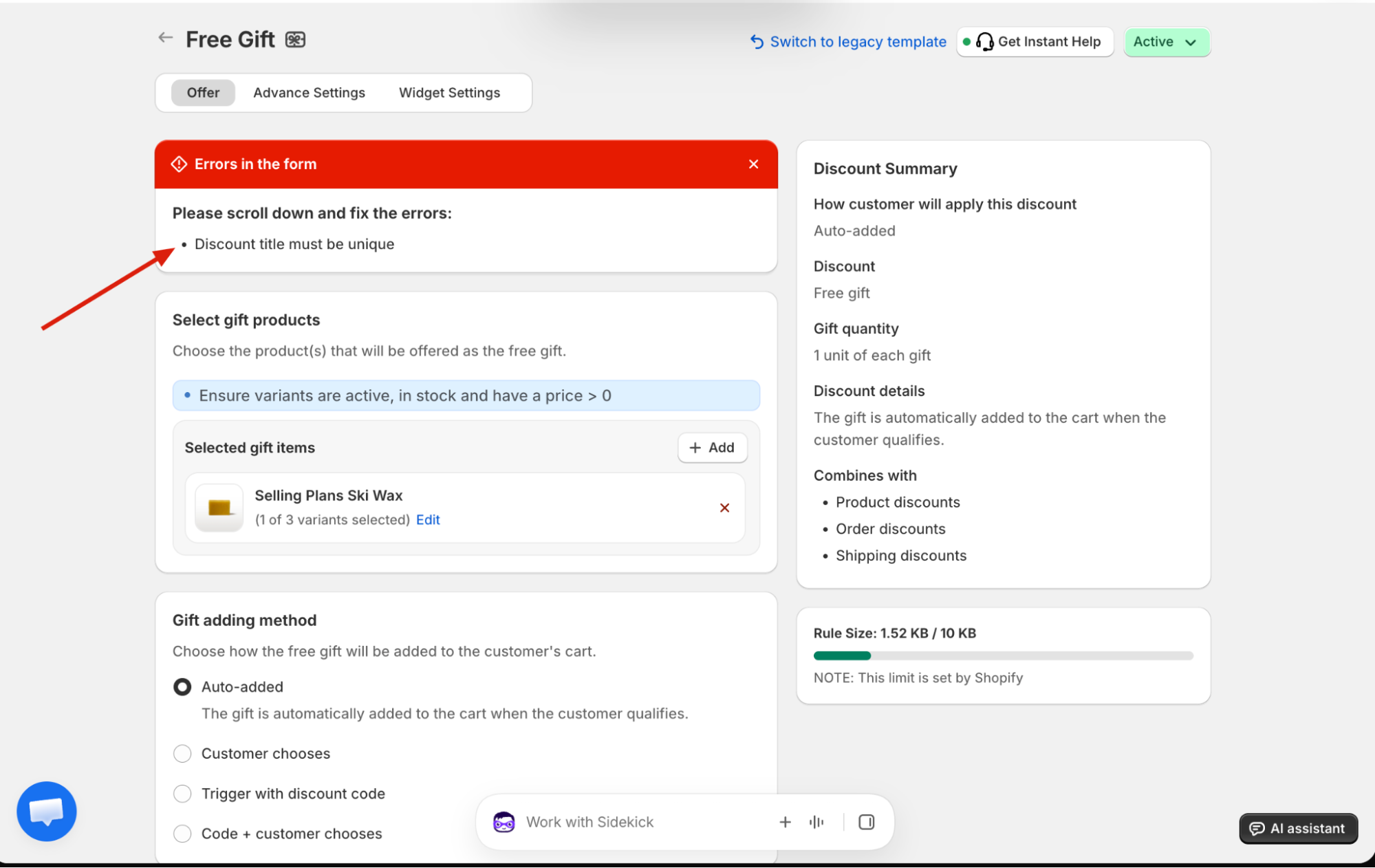
- Note the title entered in AIOD.
- Open Shopify Admin → Discounts.
- Find the existing discount that uses the same title.
- Keep the existing discount and enter a different customer-facing title for the new AIOD promotion.
- Edit or delete the existing discount only when you have confirmed that it is no longer needed.
- Return to AIOD and save again.
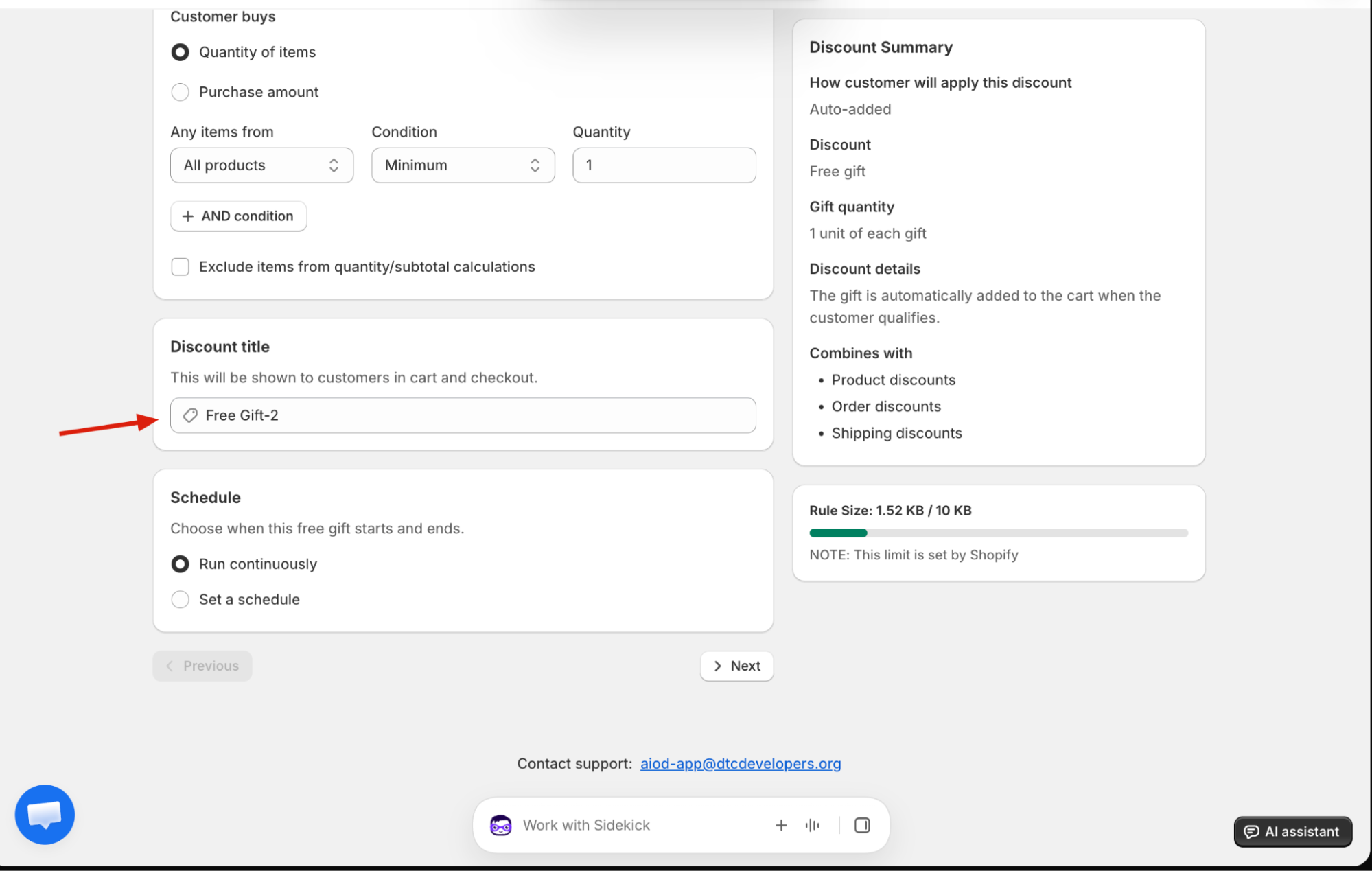
Choose a title that is unique and useful to shoppers
Adding a random suffix may remove the conflict, but the title still needs to make sense when a customer sees it. Use a short description of
the benefit or campaign, such as October Free Gift or VIP 20% Off. If that title is already in use, add a meaningful
qualifier such as the collection, audience, or campaign period.
- Make the benefit easy to recognize in the cart and at checkout.
- Use a campaign-specific detail when similar promotions run more than once.
- Avoid changing the code when the error names the title.
- Avoid deleting the existing discount until you know it is safe to remove.
What to check if the error remains
- Read the error again and confirm whether it names the code or the title.
- Review the complete Discounts list for an older promotion using the same value.
- Confirm the replacement value is actually different before saving.
- Save the AIOD promotion again.
If you still cannot identify the conflicting discount, contact AIOD support and include the exact error message plus the code or title you are trying to save.
Frequently asked questions
Why does Shopify require a unique discount code?
Shopify does not allow two discounts in the same store to use the same redeemable code. Choose another code or remove the old discount only when it is no longer needed.
Why must the discount title be unique?
The discount title identifies the automatic discount and is shown to customers in the cart and at checkout. Enter a different customer-facing title when Shopify reports a conflict.
Do I need to change both the Discount Code and Discount title?
No. Change the Discount Code when the code conflicts. Change the Discount title when the title conflicts.
Can I keep the existing discount?
Yes. Leave the existing discount unchanged and give the new AIOD promotion a different code or title.